Keyboard Jump
Type the word on the next platform to leap up before the rising water catches you.
NO BEST YET — PLAY A ROUND
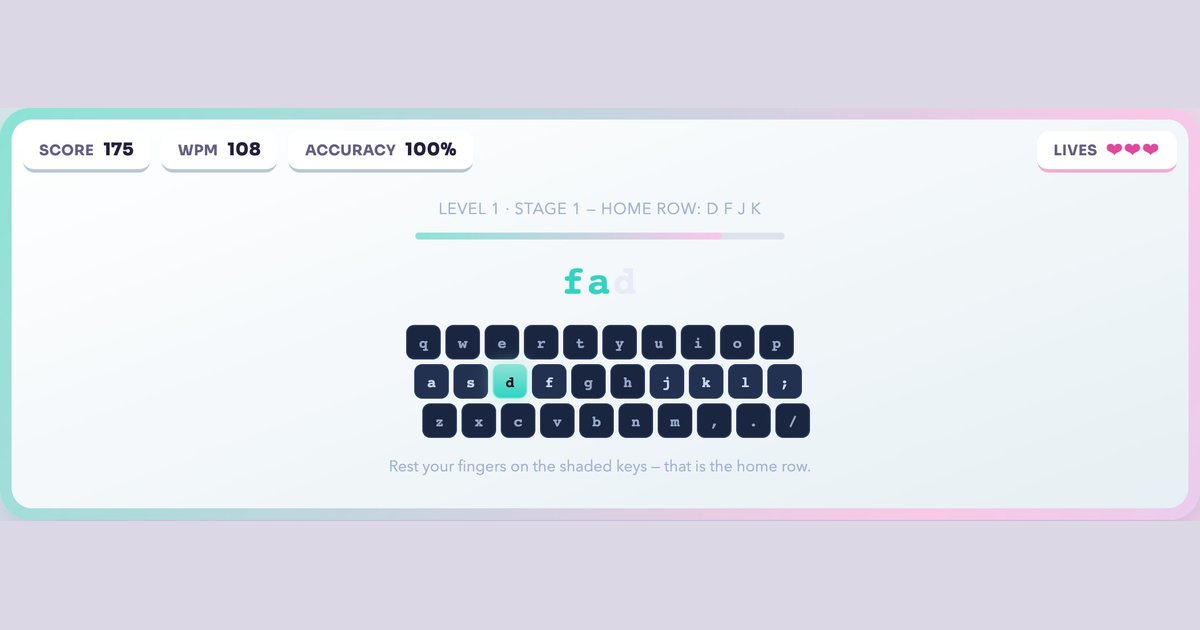
Twelve stages, four levels, one row at a time — the way the home row has always been taught. Type the word on screen and the next key you need lights up on the keyboard below. Get three keys wrong and the run ends.
Last updated:
| Course length | 12 stages across 4 levels |
|---|---|
| What each level teaches | Level 1: Home row: d f j k, Home row: a s l ;, Home row: g h; Level 2: Top row: e i r u, Top row: t y w o, Top row: q p; Level 3: Bottom row: c v m n, Bottom row: x z b, Whole keyboard; Level 4: Capital letters, Numbers, Punctuation |
| To clear a stage | 6 words typed correctly |
| Mistakes allowed | 3 wrong keys end the run |
| Suggested age | 6+ |
| Cost and setup | Free, runs in the browser (HTML5, no Flash), no account needed |
The course is built the same shape as the classic four-level, three-stage structure. Level 1 keeps your hands on the home row and adds keys in pairs: d f j k, then a s l ;, then g h. Level 2 reaches up to the top row, Level 3 drops to the bottom row, and Level 4 finishes with capitals, numbers and punctuation. Clear six words and the next stage unlocks.
The keyboard drawn under the word is the whole point. The next key you need glows, and the eight home-row keys stay shaded so your fingers have somewhere to return to between reaches. Looking at the screen keyboard instead of your hands is what eventually turns into touch typing.
The original was built in Adobe Flash. Every major browser removed Flash support in early 2021, and BBC Bitesize never rebuilt the game in HTML5, so the page no longer loads anything playable. There is nothing to fix on your end and no plugin that brings it back — the software it needed does not exist in modern browsers.
This game is our own, written from scratch in plain JavaScript. It is not the BBC's game, not a port of it, and not affiliated with the BBC in any way. What it shares is the teaching method: home row first, keys introduced in small groups, twelve short stages instead of one long lesson. If you came here looking for the original, that method is the part worth keeping.
Level 1 covers the home row on its own, which is where most people who "can't type" actually get stuck — the hands never learn a resting position, so every word starts with a hunt. Level 2 adds the top row while keeping home-row anchors in every word, so you practise reaching up and coming back rather than reaching and drifting.
Level 3 brings in the bottom row, the row most self-taught typists use worst, and finishes with a whole-keyboard stage. Level 4 is the part free typing courses usually skip: capitals with the shift key, the number row, and everyday punctuation like apostrophes and hyphens. Real writing is full of those, so a course that stops at letters leaves you slow where it counts.
The stage length is deliberately short — six words — because a seven-year-old will finish a stage in a minute or two and see progress immediately. There is no timer and no score pressure during a stage; the only fail condition is three wrong keys, which resets the run rather than punishing a slow one.
For a classroom there is nothing to install, no student accounts to create and no ads. If you want a gentler starting point for very young players, the animal typing game uses short animal names with no timer at all. When the home row feels automatic, Keyboard Jump is the natural next step, and the full age-sorted lineup is on our typing games for kids page.
Earn badges as you play — they save on this device, or sign in to keep them on every device and join the leaderboard.
Keyboard Jump
Type the word on the next platform to leap up before the rising water catches you.
Animal Typing Game
Type each animal's name to guide it home. Relaxed pace, great for warming up.
Alphabet Typing Game
Type A to Z as fast as you can, timed to the hundredth of a second. The record is 3.37s.
Number Typing Game
Ten-key drill: whole numbers, decimals, currency and codes drop down a ledger.
No. It ran on Adobe Flash, browsers removed Flash in early 2021, and BBC Bitesize never rebuilt it in HTML5. The page may still exist but nothing playable loads.
No. This is our own game, written in plain JavaScript, and it is not affiliated with or endorsed by the BBC. It follows the same home-row teaching method — four levels, twelve stages — but the game, words and code are ours.
No. It runs in any modern browser exactly like a normal web page. Flash has not existed in browsers since 2021 and nothing here uses it.
Four levels of three stages each, twelve in total. Level 1 is the home row, Level 2 the top row, Level 3 the bottom row, and Level 4 covers capitals, numbers and punctuation.
It was designed around 7 to 11 year olds and this version keeps that pace, but the home row is the same skill at any age — plenty of adults who never learned touch typing start here.
Free, with no account, no download and no ads. Signing in is optional and only adds cross-device progress and leaderboards.
Most players clear all twelve stages in 20 to 30 minutes on a first run, though the point is repetition — coming back to Level 1 for a few minutes a day builds the muscle memory faster than one long sitting.
Yes. There is nothing to install, no student logins to create and no advertising. It works on any browser the lab already has.